There are three high-level topics that often come up during my discussions with people trying to adopt Spec-Driven Development (SDD):
- The Starting Point: Can I pick a story from my existing backlog in Jira, Azure DevOps (ADO), or GitHub Issues?
- Roles and Handoffs: Do all my team members, including the Product Team, now require Git access just to view the specs?
- All artifacts in a single monorepo: While colocation of artifacts may have its advantages, should we risk overcrowding the repository with business use cases, technical designs, tasks, and code?
While many of us eventually switch to entirely new workflows, adoption is much smoother when we provide onboarding ramps. It helps to see the value of SDD before making fundamental changes to how we work. In this article, I attempt to address these questions through a demo workflow using OpenSpec for SDD and Linear for product planning.
Starting Where the Backlog Lives
One of the most frequent questions I get regarding Spec-Driven Development (SDD) is: Where is the starting point? Should you pick a story from Jira, Azure DevOps, or Linear? The answer is: Wherever your backlog lives. If that is where your requirements start, that is where your SDD workflow can begin. With most SDD tools largely focused on maintaining all artifacts in a single place, it can take a while to figure out how we integrate them into our workflows. We may also need to sync progress back to the team and keep everyone in the loop without forcing non-developers into a code repository. In this walkthrough, I use Linear and OpenSpec to explore a workflow that lets us use a project management tool or board view alongside an SDD-based workflow.
Click here to view the workflow diagram →
It is easy enough to feed a ticket to an AI agent. But what happens as the agent makes progress? In a typical siloed workflow, the developer has to manually update the ticket status. In this walkthrough, I demonstrate how OpenSpec (via MCP) can handle the paperwork for you. As the agent moves through the Propose, Apply, and Archive stages, the corresponding Linear issue automatically shifts from Backlog to In Progress and finally to Done. This ensures that the source of truth for project status is updated in real-time, without manual intervention.
Roles and Handoffs
A common friction point in SDD is the Git barrier. Do Product Owners or stakeholders now need to learn Git to view the latest application specifications? By keeping the product backlog in Linear in sync with the specs in the repo, we can address this point to an extent.
- Product Owners can stay in the tools they love (like Linear) to define the business use case and monitor progress.
- Developers/Agents handle the technical detailing of the use cases and implementation within the repository.
This workflow uses the backlog as a communication bridge, allowing for human-AI collaboration without forcing every role into the codebase.
Separate the What from the How
An important point to think about is the separation of concerns.
- The What: The business use cases and acceptance criteria (stored in Linear or other product backlogs).
- The How: The technical design and detailed task list (stored in the Git Repo).
Maintaining this separation is a necessary first step in addressing another important point, which is about the suitability of SDD for non-monorepo code organization. If we can separate the “What” from the “How”, then whether the “How” is handled in a monorepo or several repos (example: frontend, backend, etc.) can be tackled later.
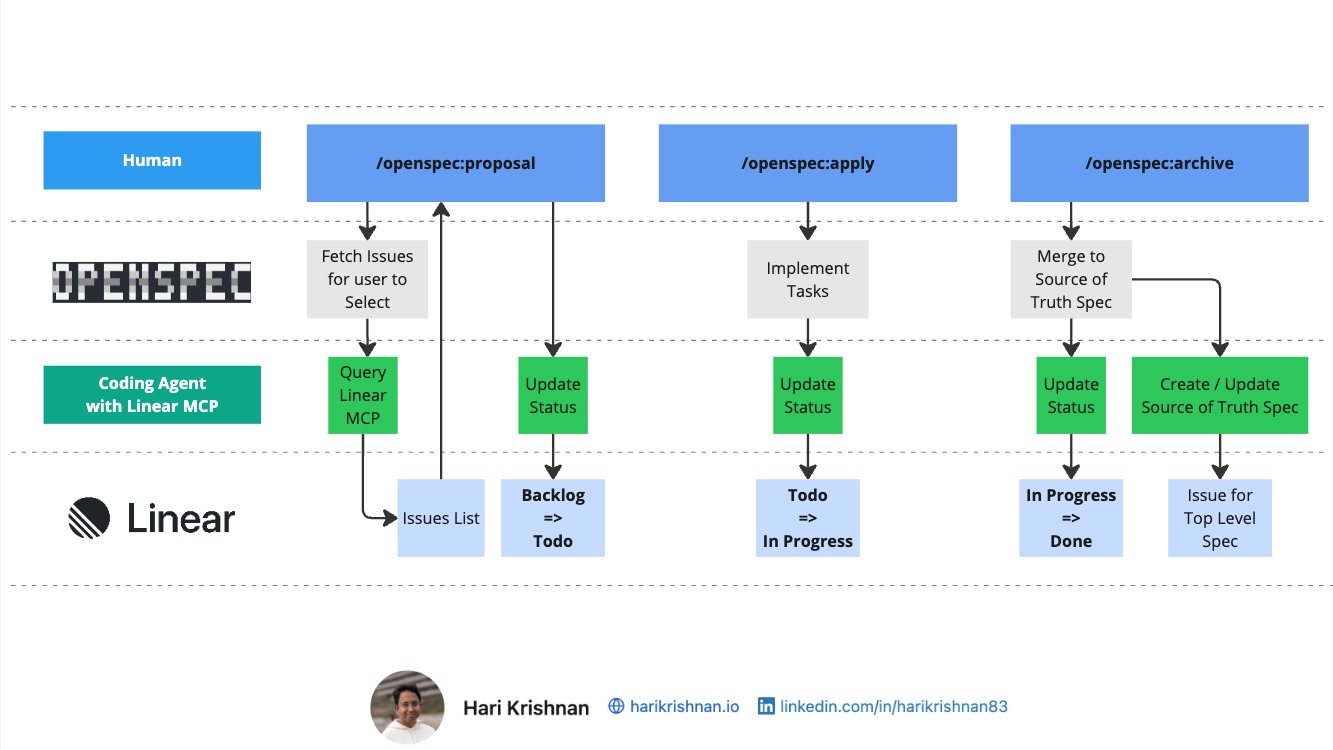
Click here to view the workflow diagram in full size
GitHub code: OpenSpec Linear MCP fork
What’s Next?
To keep this article focused, I have not yet touched on:
- Multi-repo use cases: How to manage specs that span across code repos.
- AI-Assisted Backlog Generation: Using AI to help write the stories in the first place.
- And more: Parallel implementation of stories, sync issues, etc.
I will be covering these in future articles.
I would love to hear your feedback. How are you integrating SDD into your existing toolset? Are you finding success in syncing your AI progress back to your project management boards?