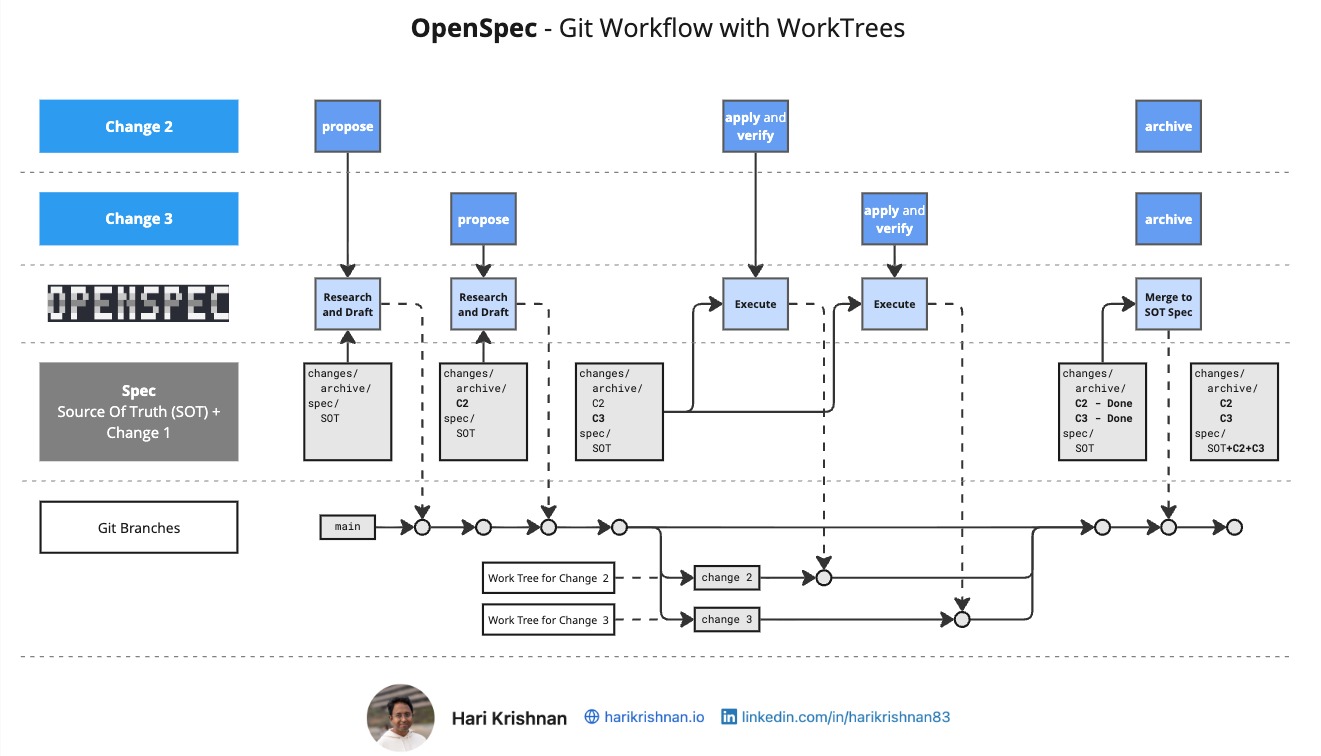
Git WorkTrees let you check out multiple branches simultaneously in separate directories — each with its own working state. Combined with SubAgents in OpenCode, this unlocks genuine parallel feature development inside a Spec-Driven Development workflow.
The key is knowing where each step of the OpenSpec workflow belongs: proposal on main, implementation in worktrees, archive after merge.
Propose on the Main Branch
Always run /opsx:propose (or /opsx:explore + continue) on the main branch, never inside a worktree branch.
OpenSpec’s proposal step analyses your active changes alongside the source-of-truth specifications to detect conflicts and gaps. If you propose from a worktree branch, OpenSpec only sees that branch’s delta — it loses visibility into other in-flight changes and the authoritative specs on main. Proposing on main keeps everything in view.
Once a proposal is created, you can immediately start on the next proposal for a different feature, still on main. Proposals are lightweight — they don’t touch implementation yet.
Apply with SubAgents and WorkTrees
With proposals ready on main, hand each one off to a SubAgent with its own WorkTree. Each SubAgent works in an isolated branch, applying its change independently. Because worktrees share the same git object store, you get true parallelism without duplicating the repository.
Before a worktree branch is eligible to merge, run Verify inside that same SubAgent session. Verify checks that the implementation matches the proposal’s spec, design, and task artifacts. Running it within the worktree ensures verification before merge so that we can address any issues flagged in the report within that worktree.
Merge First, Then Archive
Once a worktree branch passes Verify, merge it back to main before running Archive. Archive syncs the change’s delta specs into the source-of-truth specifications on main. If you archive while still on a worktree branch, the spec merge runs against an incomplete view of main — other merged features aren’t visible yet — and conflicts become likely.
The rule: merge → archive, in that order, every time. You can Archive each change individually after its merge, or merge all completed worktrees first and then run Bulk-Archive in one pass.
Commit Discipline
More commits means more recovery points. Aim to commit at every logical boundary:
- After the change proposal is created, or after each proposal artifact is generated individually (spec, design, tasks)
- After each logical code change inside the worktree branch
- After running Archive (the spec sync is a meaningful state change)
There is no such thing as too many commits in this workflow. If a SubAgent session goes wrong mid-apply, a dense commit history gives you a clean point to resume from rather than starting over.
Video
For a reference skill that automates the bulk-apply workflow, see the openspec-bulk-apply-change skill.
For worktree-based skills, Superpowers is worth exploring — it provides a skill framework designed to work with git worktrees.